actionstatus visualforce disable screen actionStatus visualforce component displays the status of an AJAX update request. An AJAX request can either be in progress or complete. Depending upon the AJAX request status (whether AJAX request is …
actionStatus visualforce salesforce actionStatus visualforce component displays the status of an AJAX update request. An AJAX request can either be in progress or complete. Depending upon the AJAX request status (whether AJAX request is in …
Workflow Rules in Salesforce What is Salesforce Workflow Rules? Workflow lets you automate standard internal procedures and processes to save time across your org. A workflow rule is the main container for a set of workflow instructions. …
apex random number Salesforce apex random number Salesforce Many time we have requirement to generate random number in Apex. It can be achieved using Math.random() function. This method return a positive Double that is greater than …
Get Record Id in Lightning Component Get Record Id in Lightning Component using force:hasRecordId Getting current record id in lightning component or lightning aura component is very easy. We need to add force:hasRecordId interface to …
We can render any page as pdf by adding renderAs attribute to <apex:page> and specifying “pdf” as value. renderAs value is name of any supported content converter. Currently PDF is the only supported content converter. Setting renderAs attribute to “pdf” renders the page as a PDF.
Rendering a Visualforce page as a PDF is intended for pages that are designed and optimized for print. Standard components that are not easily formatted for print or contain form elements like inputs, buttons, any component that requires Javascript to be formatted, should not be used. We should always verify the format of your rendered page before deploying it.
Sometimes PDF fails to display all the characters properly. In that case we should adjust the fonts in our CSS to use a font that supports our needs. We can use style element for displaying content properly in PDF.
In the example below, we are showing 10 account in table in visualforce page which is renderAs “pdf”. We are just adding renderAs attribute in apex:page and giving “pdf” as its value.
public with sharing class PdfExampleController {
    public List accList{get;set;}
    public PdfExampleController (){
        accList = [select id,name,type,accountnumber,annualrevenue,Rating from account limit 10];
    }
}
This post is going to be interesting. As we all know that each record in salesforce is identified by record id which is unique for every organisation. Salesforce record id can be 15 digit case sensitive or 18 digit case insensitive. Last three digits of 18 digit record id provide checksum of first 15 digits.
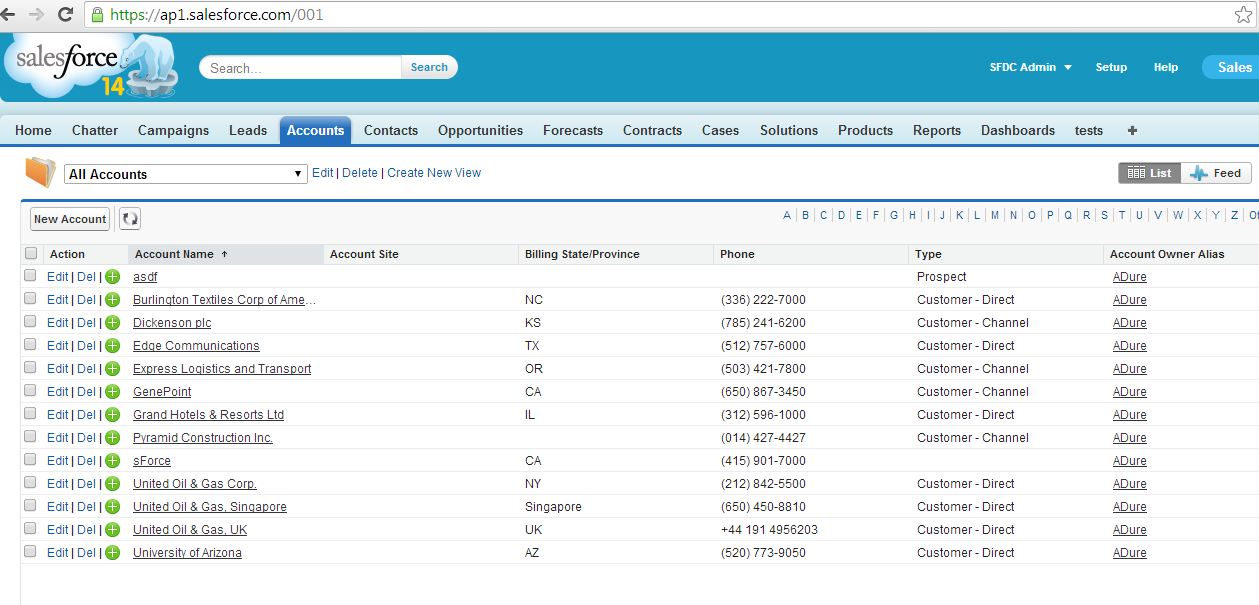
Now interesting and important point is that first 3 digits of record id determines SObject type of record. For every salesforce object first 3 digit of record id is unique. And for all standard salesforce objects, first 3 digits of record id is constant. For example, for standard Account object first 3 digit of record id is 001. Similarly for Contact object first 3 digit is 003. These first three digit of record id is known as ‘Record id prefix’.
For each custom object also, first 3 digit of record id is unique.
Trick 1:
Remembering these 3 digits of object’s record id is very useful. When we will enter first 3 digits of record id after instance URL we will be on List view page for that particular object.
Trick 2:
We can also directly go to any object tab if we remember first 3 digit of object’s record id. For example, as we know first 3 digits of Account object’s record id is 001. So if we will enter ‘001/o ‘ after instance URL, we will land to Account tab. In similar way we can go to any tab if we know or remember first 3 digits of record id.
actionRegion provides an area of a Visualforce page that decides and separates which components should be processed by the force.com server when an AJAX request is generated. Only the components which are inside actionregion component are processed by server, so it increases visualforce page performance. Here components means, all visualforce tags like inputField, outputField, outputPanels etc.
actionregion is one of the most important tag which helps in increasing page performance. So we should try to make maximum use of actionregion in visualforce page. actionRegion component only defines which components the server processes during a request, it does not define which of the page are re-rendered when the request completes. We will still use reRender attribute on action component to decide area which should be rerendered AJAX request completes.
One more important point to note is that even when we use <apex:actionRegion> component, whole form is still submitted but only area which is inside actionRegion is processed by server.
I will explain importance of actionRegion with help of two examples. First example will not use actionRegion and second example will use actionRegion. Here in both example we are trying to show phone textbox, when we are selecting customer priority as high.
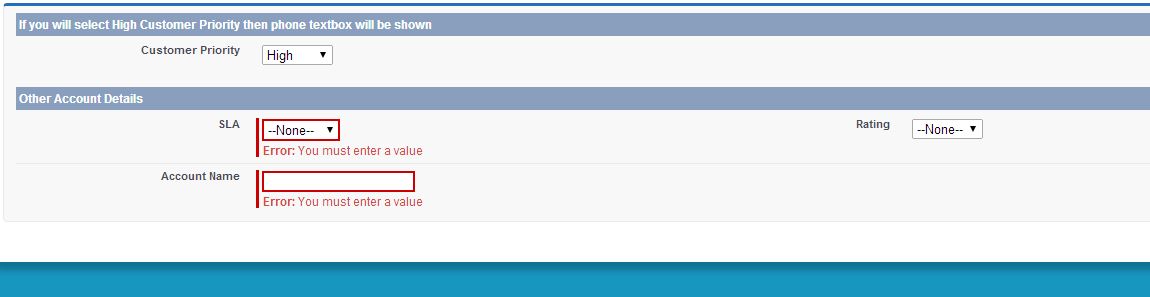
In this example, we are trying to show phone textbox when we are selecting high customer priority, then we are getting error as SLA and Account name is required. So validation fails.
Visualforce Page:
<apex:page controller="withoutActionregionController" tabStyle="Account">
    <apex:form id="myform">
        <apex:pageBlock id="pageId">
            <apex:pageBlockSection title="If you will select High Customer Priority then phone textbox will be shown" columns="1" id="out" collapsible="false">

                <apex:pageBlockSectionItem >
                    <apex:outputLabel value="{!$ObjectType.Account.fields.CustomerPriority__c.label}" for="priority"/>

                    <apex:inputField value="{!acc.CustomerPriority__c}" id="priority" >
                        <apex:actionSupport action="{!priorityChanged}" reRender="pageId" event="onchange"/>
                    </apex:inputField>
                </apex:pageBlockSectionItem>

                <apex:inputField value="{!acc.Phone}" rendered="{!showPhone}"/>
            </apex:pageBlockSection>

            <apex:pageBlockSection title="Other Account Details" columns="2" collapsible="false">
                <apex:inputField value="{!acc.SLA__c}" required="true"/>
                <apex:inputField value="{!acc.Rating}"/>
                <apex:inputField value="{!acc.name}"/>
            </apex:pageBlockSection>
        </apex:pageBlock>
    </apex:form>
</apex:page>
Apex Code:
public class withoutActionregionController {
    public Account acc{get;set;}
    public Boolean showPhone{get;set;}

    public withoutActionregionController(){
        acc = new Account();
        showPhone = false;
    }

    public PageReference priorityChanged(){
        if(acc.CustomerPriority__c == 'High'){
            showPhone = true;
        }
        else{
            showPhone = false;
        }
        return null;
    }
}
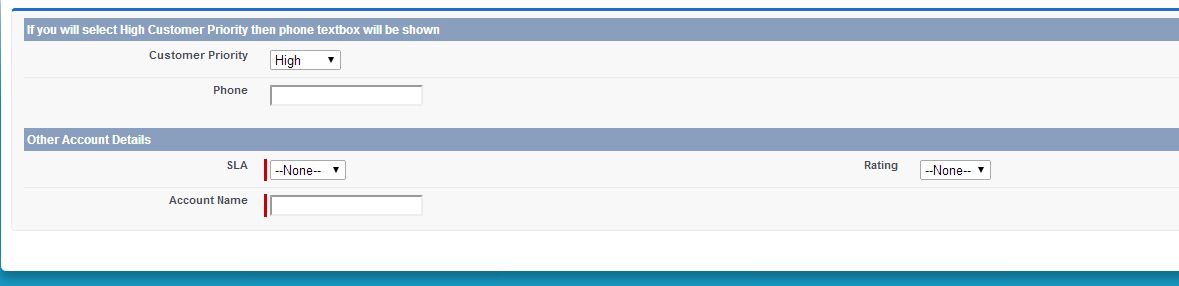
Now in second example we will use same code but with actionRegion tag. So in second example no validation error will be returned as only code inside actionregion component is processed by server.
Difference between Export & Export All in data loader is really interesting.
I was asked this question in one of my job interview.
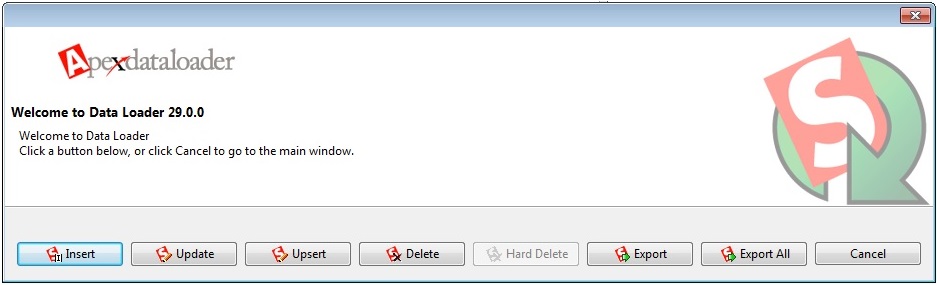
Export and Export All
There are two buttons available in dataloader ‘Export’ & ‘Export All’. Difference in both button functionality is very small. When we use ‘Export’ button for any object in salesforce, all records( excluding records present in Recycle Bin) present in the system for that particular object are exported to a .csv file. But when we use Export All, all records (including records present in Recycle Bin) for that particular object are exported to a .csv file. Deleted records present in recycle bin are also called ‘soft Deleted’ records.
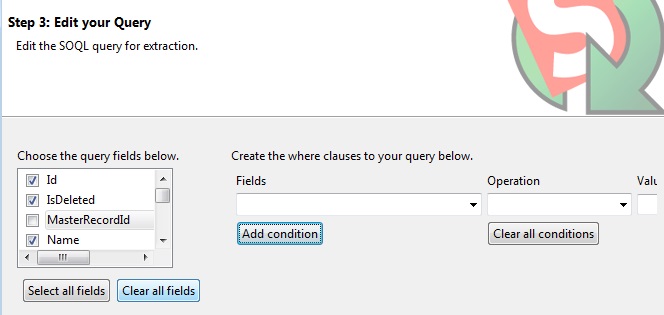
When you choose fields to be extracted using data loader, you can select IsDeleted field as well because it tells which record is soft deleted and which is not.
IsDeleted
(IsDeleted = true) –> record has been soft deleted.
(IsDeleted = false) –> record has not been deleted.
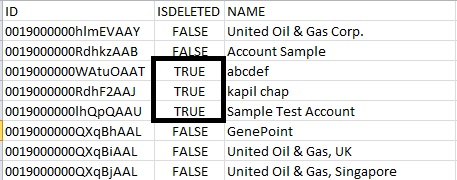
I clicked on Export All and in the screenshot below, you can see there are some records for which IsDeleted is true. These are some records that were present in recycle bin(soft deleted).
Actionpoller acts as a timer in visuaflorce page. It is used to send an AJAX request to the server depending on the timeinterval that we specify in interval attribute (time interval has to be specified or else it defaults to 60 seconds).Each request can result in a full or partial page update.
<apex:actionPoller> has following important attributes:
interval: The time interval between AJAX update requests, in seconds. This value must be 5 seconds or greater, and if not specified, defaults to 60 seconds
action: The action method invoked by the periodic AJAX update request from the component.
reRender: Comma separated id’s of one or more components that are refreshed when request completes.
In the example below, action poller calls the method “callMethod” every 10 seconds. In callMethod, the variable “seconds” counter is incremented by 10. Rerender attribute refreshes the outputText, so seconds value in page will be refreshed.
public class actionpollerDemoController {
public  Integer seconds{get;set;}
  public actionpollerDemoController(){
   seconds = 0;
  }

  public void callMethod(){
    seconds = seconds + 10;
  }
}
Immediate attribute of commandbutton and commandlink in visualforce
This is basically used when we don’t want our validation rules to be fired during any server request.
It is a Boolean value that specifies whether the action associated with this component should happen immediately, without processing any validation rules associated with the fields on the page. If set to true, the action happens immediately and validation rules are skipped. If not specified, this value defaults to false.
We generally use it to make functionality of ‘Cancel’ button or ‘Back to Page’ button, where we don’t want validation rule to get executed. If we don’t use immediate=true then on click of cancel button also, validation rules will get executed. VisualForce Component CommandButton
actionfunction visualforce salesforce. apex:actionFunction component provides support for invoking controller action methods directly from JavaScript code using an AJAX request.
It is different from actionsupport which only provides support for invoking controller action methods from other Visualforce components, actionfunction defines a new JavaScript function which can then be called from JavaScript code.
In the example below, we are showing one picklist with name customer priority. Whenever we will change customer , then javascript method will be called. And we have specified corresponding controller action method in actionfunction component method. In controller method we are checking if customer priority is high then we are setting boolean variable as true. So phone textbox will be rendered automatically without refreshing full page
Visualforce Code:
<apex:page controller="actionFunctionController" tabStyle="Account">
    <apex:form >
        <apex:actionFunction name="priorityChangedJavaScript" action="{!priorityChanged}" rerender="out"/>
        <apex:pageBlock >
            <apex:pageBlockSection title="If you will select High Customer Priority then phone textbox will be shown" columns="1" id="out" collapsible="false">
                <apex:inputField value="{!acc.CustomerPriority__c}" onchange="priorityChangedJavaScript()"/>
                <apex:inputField value="{!acc.Phone}" rendered="{!showPhone}"/>
            </apex:pageBlockSection>
        </apex:pageBlock>
    </apex:form>
</apex:page>
Apex Code:
public class actionFunctionController {
    public Account acc{get;set;}
    public Boolean showPhone{get;set;}

    public actionFunctionController(){
        acc = new Account();
        showPhone = false;
    }

    public PageReference priorityChanged(){
        if(acc.CustomerPriority__c == 'High'){
            showPhone = true;
        }
        else{
            showPhone = false;
        }
        return null;
    }
}
Salesforce record Id 15 digit to 18 digit. Salesforce record Id uniquely identifies each record in salesforcce. Salesforce record Id can either be 15 or 18 digit. 15 digit salesforce record id is case sensitive and 18 digit salesforce record id is case insensitive. Every record in salesforce is identified by unique record Id in every salesforce organization.
15 digit case-sensitive version is referenced in the UI and also visible in browser
18 digit case-insensitive version which is referenced through the API
The last 3 digits of the 18 digit Id is a checksum of the capitalization of the first 15 characters, this Id length was created as a workaround to legacy system which were not compatible with case-sensitive Ids. The API will accept the 15 digit Id as input but will always return the 18 digit Id.
In this post I will explain the process to convert 15 digit salesforce Id to 18 digit salesforce Id.
actionStatus visualforce component displays the status of an AJAX update request. An AJAX request can either be in progress or complete.
Depending upon the AJAX request status (whether AJAX request is in progress or complete), this component will display different message to user. In many scenarios AJAX request takes some time. So we should display some message to user that your request is in progress. Once request is complete, we can display some different message to user.
Using actionstatus, we can also display some gif (graphic Interchange Format), which shows to user that their request is in progress. It gives very good presentation to end user.
In the example below, we are using actionSupport component for AJAX request. You can see my previous post to know more about actionsupport component. In this example we are showing some text message to user while AJAX request is in progress using actionstatus component. It shows some different message once request is complete.
When user will click on ‘Click here for increment’ or ‘Click here for decrement’, then count will be incremented or decremented accordingly. Also when request is in progress, message will be shown to user.
actionSupport component adds AJAX support to other components in visualforce. It allows components to be refreshed asynchronously by calling the controller’s method when any event occurs (like click on button). It allows us to do partial page refresh asynchronously without refreshing full page.
In the example below, initially count value is set to 0. But when we will click on ‘Click here to increment! ‘, then controller action method will be called and count will be incremented. Also outputText component will be rendered without refreshing complete page.
Similarly when we will click on ‘Click here to decrement!’, then controller action method will be called and count will be decremented. Also outputText component will be rendered without refreshing complete page.
apex:actionSupport has following attributes in our example:
action: action attribute specifies the controllers action method that will be invoked when event occurs.
event: It is DOM event that generates AJAX request
reRender: It is comma separated id’s of components that needs to be partially refreshed. In our example, we have given its value as ‘out’. So component with ‘out’ id will be refreshed without refreshing complete page.
We use cookies to ensure that we give you the best experience on our website. If you continue to use this site we will assume that you are happy with it. AcceptRead More
Privacy & Cookies Policy
Privacy Overview
This website uses cookies to improve your experience while you navigate through the website. Out of these, the cookies that are categorized as necessary are stored on your browser as they are essential for the working of basic functionalities of the website. We also use third-party cookies that help us analyze and understand how you use this website. These cookies will be stored in your browser only with your consent. You also have the option to opt-out of these cookies. But opting out of some of these cookies may affect your browsing experience.
Necessary cookies are absolutely essential for the website to function properly. This category only includes cookies that ensures basic functionalities and security features of the website. These cookies do not store any personal information.
Any cookies that may not be particularly necessary for the website to function and is used specifically to collect user personal data via analytics, ads, other embedded contents are termed as non-necessary cookies. It is mandatory to procure user consent prior to running these cookies on your website.


Recent Comments