What Is Salesforce

What is Salesforce

What is Salesforce?

Salesforce is the world’s #1 customer relationship management (CRM) platform. Salesforce provides cloud-based, CRM applications for sales, service, marketing, and more.
What is Salesforce

Salesforce has essentially changed how enterprise software is delivered and used. Its software is cloud-based and hence doesn’t need IT experts to set up anything. Salesforce has defined the ideal way as how to connect with customers. Building meaningful and lasting bond with the customers, identifying their needs, address problems faster and deploy apps that are customer focused is all possible through Salesforce.

Salesforce Technologies is one of the leading and very hot Technology in IT industry. Through Salesforce.com Technology thousands of Job opportunity are created for Salesforce developers and Salesforce Administration Job Seekers. As per Forbes magazine, nearly 55% of enterprises predict cloud computing will enable new business model in three years. So Salesforce is one of the Cloud Computing Technology which have bright future in the upcoming years. Salesforce provides different enterprise cloud computing applications to all size industries and businesses.

Salesforce applications are provided on subscription basis primarily through direct sales effort and indirectly through partners.

Salesforce Cloud Products:

Salesforce Sales Cloud

Salesforce Sales Cloud is a customer relationship management (CRM) platform designed to support sales, marketing and customer support in both business-to-business (B2B) and business-to-customer (B2C) contexts. Sales Cloud is the most popular salesforce cloud product.

Sales Cloud puts all your customer information in one place, gives you insight into your customers, and even gives you intelligent alerts about the best leads. You can see real-time reports of how the business is doing, and the intuitive workspace helps you be productive.

Sales Cloud is a fully customizable product that brings all the customer information together in an integrated platform that incorporates marketing, lead generation, sales, customer service and business analytics and provides access to thousands of applications through the AppExchange. The platform is provided as Software as a Service (SaaS) for browser-based access; a mobile app is also available. A real-time social feed for collaboration allows users to share information or ask questions of the user community.

Salesforce Marketing Cloud

Salesforce Marketing Cloud is a provider of digital marketing automation and analytics software and services. It was founded in 2000 under the name ExactTarget. ExactTarget was renamed to Salesforce Marketing Cloud in 2014 after the acquisition by Salesforce.

Salesforce Marketing Cloud develops marketing automation and analytics software for email, mobile, social and online marketing. It also offers consulting and implementation services.[27] The software is sold primarily on a multi-year subscription basis. The price of the subscription is based on what features are enabled, number of users and level of customer service.

Salesforce Service Cloud

Service Cloud is a customer service and support application. It helps keep your customers happy and your support team sane, whether your customers reach out to you by email, phone, social media, online communities, or real-time Web chat. These different ways of reaching out are called channels, and they help you help your customers through their preferred communication tool. Giving your customers a choice in how they communicate with your company is the first step towards delivering extraordinary service.

Salesforce Einstein

Salesforce Einstein is a set of best-in-class platform services that bring advanced AI capabilities into the core of the Customer Success Platform, making Salesforce the world’s smartest CRM.

Powered by advanced machine learning, deep learning, predictive analytics, natural language processing and smart data discovery, Einstein’s models will be automatically customized for every single customer, and it will learn, self-tune, and get smarter with every interaction and additional piece of data. Most importantly, Einstein’s intelligence will be embedded within the context of business, automatically discovering relevant insights, predicting future behavior, proactively recommending best next actions and even automating tasks. With Einstein, the world’s #1 CRM is now the world’s smartest CRM and we’re bringing intelligence to all of our clouds. But don’t take my word for it. See below to hear from our Cloud GMs about what Einstein means for all our clouds.

Community Cloud

Community cloud you create an online community  to connect with the important folks in your life (you know, customers, partners, and employees) in a new and different way.

Here are some common use cases of community

Customer Service and Account Portals
Empower your customers to find solutions to their customer-service issues on their own with access to your knowledge base, your service agents, and peer-to-peer support. In addition, give customers access to their data in a member portal.
Partner Relationship Management and Channel Sales
Increase your (and your partners’) revenue stream by collaborating on opportunities and deals. Onboard partners quickly by sharing content and training materials.
Employee Relationships
Retain happier employees by providing a space for them to easily complete their onboarding, learn about benefits, and resolve HR issues.

Commerce Cloud

Commerce Cloud is a cloud-based online business stage that can oversee items giving a wide scope of offices. It conveys a complete computerized involvement to its clients. It upgrades clients’ shopping background. It associates the clients or customers with the correct item at the opportune time. It is utilized for associating merchandisers with the correct data they need so as to settle on the correct business choices with Artificial Intelligence.


Technologies in Salesforce

Apex

Apex is a programming language that empowers designers to execute stream and trade control enunciations on the Force.com organize. As a tech lingo, Apex is composed, easy to use, data connected with, careful, encouraged, multitenant careful, normally upgradeable, easy to test, and shaped. For more details about apex please refer What is Apex

Visualforce

Visualforce is a structure that enables the creation of dynamic, reusable interfaces that can be encouraged locally on the Force.com. It might be used to make entire custom pages inside a Salesforce affiliation, or planners can interface their own one of a kind method of reasoning with a controller class written in Apex. Creators can use Visualforce pages to override standard gets, revoke tab audit pages, describe custom tabs, embed parts in detail page designs, make dashboard portions, re-try sidebars in the Salesforce support, and incorporate menu things.

Salesforce Lightning

Salesforce Lightning is the collection of tools and technologies behind a significant upgrade to the Salesforce platform. Lightning includes:

  • Experience: A set of modern user interfaces optimized for speed. This includes the Lightning Experience, Salesforce1 Mobile app and template-based communities.
  • Lightning Component Framework: A JavaScript framework and set of standard components that allow you to build reusable components to customize the Lightning Experience, Salesforce1 Mobile app and template-based communities and build your own standalone apps.
  • Visual Building Tools: Drag-and-drop technologies for fast and easy app building & customizations. Use the Lightning App Builder to customize the Lightning Experience and Salesforce1 Mobile app. Use the Community Builder to customize template-based communities.
  • Lightning Exchange: A section of the AppExchange where you can find 70+ partner components to jumpstart your development.
  • Lightning Design System: Style guides and modern enterprise UX best practices to build pixel perfect apps that match the look and feel of the Lightning Experience and Salesforce1 Mobile app.

For more details about lightning please refer Salesforce Lightning
Permanent link to this article: https://www.sfdcpoint.com/salesforce/what-is-salesforce/

API Full Form? What is API?

API Full Form? What is API?

What is the full form of API?

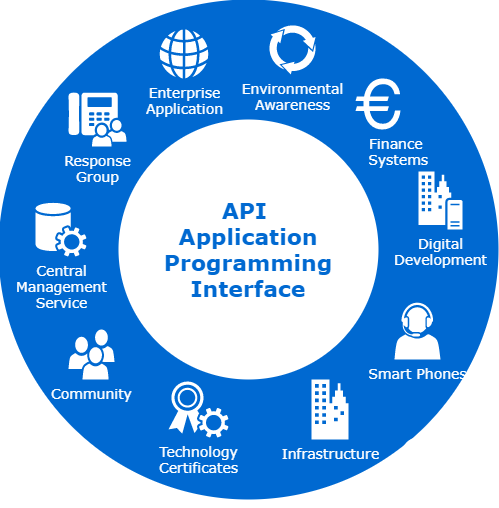
API full form is Application Programming Interface. API is an interface or communication protocol that allows two applications to talk to each other. API is an interface or communication protocol between different parts of a computer program intended to simplify the implementation and maintenance of software. API is a set of routines, protocols and tools for building software and applications.

API Full Form


API stands for Application Programming Interface.  API allows two applications to talk to each other. A programmer writing an application program can make a request to other System using API (using graphical user interface or command interface). It is a set of routines, protocols and tools for building software and applications.

An API may be for a web-based system, operating system, database system, computer hardware, or software library.

APIs let your product or service communicate with other products and services without having to know how they’re implemented. This can simplify app development, saving time and money. When you’re designing new tools and products—or managing existing ones—APIs give you flexibility; simplify design, administration, and use; and provide opportunities for innovation.

APIs by use cases

APIs can be classified according to the systems for which they are designed.

Database APIs. Database APIs enable communication between an application and a database management system. Developers work with databases by writing queries to access data, change tables, etc. The Drupal 7 Database API, for example, allows users to write unified queries for different databases, both proprietary and open source (Oracle, MongoDB, PostgreSQL, MySQL, CouchDB, and MSSQL).

Another example is ORDS database API, which is embedded into Oracle REST Data Services.

Operating systems APIs. This group of APIs defines how applications use the resources and services of operating systems. Every OS has its set of APIs, for instance, Windows API or Linux API (kernel–user space API and kernel internal API).

Apple provides API reference for macOS and iOS in its developer documentation. APIs for building applications for Apple’s macOS desktop operating system are included in the Cocoa set of developer tools. Those building apps for the iOS mobile operating system use Cocoa Touch – a modified version of Cocoa.

Remote APIs. Remote APIs define standards of interaction for applications running on different machines. In other words, one software product accesses resources located outside the device that requests them, which explains the name. Since two remotely located applications are connected over a communications network, particularly the internet, most remote APIs are written based on web standards. Java Database Connectivity API and Java Remote Method Invocation API are two examples of remote application programming interfaces.

Web APIs. This API class is the most common. Web APIs provide machine-readable data and functionality transfer between web-based systems which represent client-server architecture. These APIs mainly deliver requests from web applications and responses from servers using Hypertext Transfer Protocol (HTTP).

Developers can use web APIs to extend the functionality of their apps or sites. For instance, the Pinterest API comes with tools for adding users’ Pinterest data like boards or Pins to a website. Google Maps API enables the addition of a map with an organization’s location.

In today’s modern era, Web API is most popular API. Web API is used in our day to day use of mobile phone, laptop and other smart devices.

A Web API is an application programming interface for either a web server or a web browser. It is a web development concept, usually limited to a web application’s client-side (including any web frameworks being used)

API Release policies

APIs are one of the more common ways technology companies integrate with each other. Those that provide and use APIs are considered as being members of a business ecosystem.

The main policies for releasing an API are:

  • Private: The API is for internal company use only.
  • Partner: Only specific business partners can use the API. For example, transportation network companies such as Uber and Lyft allow approved third-party developers to directly order rides from within their apps. This allows the companies to exercise quality control by curating which apps have access to the API, and provides them with an additional revenue stream.[31]
  • Public: The API is available for use by the public. For example, Microsoft makes the Microsoft Windows API public, and Apple releases its APIs Carbon and Cocoa, so that software can be written for their platforms.

Example of an API

Most common example of using API is using google map. When we are using google map, we perform different type of requests like finding route between two points. Apps like Uber also use google API in background in their app.

REST API(Representational state transfer)

Representational state transfer (REST) is a software architectural style that defines a set of constraints to be used for creating Web services. Web services that conform to the REST architectural style, called RESTful Web services, provide interoperability between computer systems on the Internet. RESTful Web services allow the requesting systems to access and manipulate textual representations of Web resources by using a uniform and predefined set of stateless operations. Other kinds of Web services, such as SOAP Web services, expose their own arbitrary sets of operations.

REST API provides a powerful, convenient, and simple REST-based web services interface for interacting with Salesforce. Its advantages include ease of integration and development, and it’s an excellent choice of technology for use with mobile applications and web projects. For certain projects, you may want to use REST API with other Salesforce REST APIs. To build UI for creating, reading, updating, and deleting records, including building UI for list views, actions, and dependent picklists, use User Interface API. To build UI for Chatter, communities, or recommendations, use Chatter REST API. If you have many records to process, consider using Bulk API, which is based on REST principles and optimized for large sets of data.

What are methods in REST

  • GET : Retrieve data identified by a URL.
  • POST : Create a resource or post data to the server.
  • DELETE : Delete a resource identified by a URL.
  • PUT : Create or replace the resource sent in the request body.
  • PATCH : Update all the representations of the member resources of the collection resource using the instructions in the request body, or may create the collection resource if it does not exist.


SOAP API(Simple Object Access Protocol)

SOAP (abbreviation for Simple Object Access Protocol) is a messaging protocol specification for exchanging structured information in the implementation of web services in computer networks. Its purpose is to provide extensibility, neutrality, verbosity and independence. It uses XML Information Set for its message format, and relies on application layer protocols, most often Hypertext Transfer Protocol (HTTP), although some legacy systems communicate over Simple Mail Transfer Protocol (SMTP), for message negotiation and transmission.

SOAP allows developers to invoke processes running on disparate operating systems (such as Windows, macOS, and Linux) to authenticate, authorize, and communicate using Extensible Markup Language (XML). Since Web protocols like HTTP are installed and running on all operating systems, SOAP allows clients to invoke web services and receive responses independent of language and platforms.


What is difference between SOAP and REST?

SOAP API: The Simple Object Access Protocol (SOAP) is an attempt to define a standard for creating web service APIs. It is a pattern, a web service architecture, which specifies the basic rules to be considered while designing web service platforms. It typically uses HTTP as a layer 7 protocol, although this is not mandatory.

The SOAP message itself consists of an envelope, inside of which are the SOAP headers and body, the actual information we want to send. It is based on the standard XML format, designed especially to transport and store structured data. SOAP may also refer to the format of the XML that the envelope uses. SOAP is a mature standard and is heavily used in many systems, but it does not use many of the functionality build in HTTP. While some consider it slow, it provides a heavy set of functionality which is a necessity in many cases. It might now be the best solution for browser-based clients, due to its custom format.

  • Supports data in the form of XML only and not JSON.
  • Requires WSDL for the integration
  • Use SOAP API in any language that supports Web services.


REST API: The Representational State Transfer (REST) is another architectural pattern (resource-oriented), an alternative to SOAP. Unlike SOAP, RESTful applications use the HTTP build-in headers (with a variety of media-types) to carry meta information and use the GET, POST, PUT and DELETE verbs to perform CRUD operations. REST is resource-oriented and uses clean URLs (or RESTful URLs).

  • Supports both XML and JSON format
  • Preferred for mobile and web apps since JSON being Lighter the app runs smoother and faster


For more detail about API, refer to wikipedia page.

For more details about integration and API in salesforce please refer Salesforce Integration Interview questions and answers

Permanent link to this article: https://www.sfdcpoint.com/salesforce/api-full-form/

Salesforce Web to Lead

Salesforce Web to Lead

What is Salesforce Web to Lead

Salesforce web to lead is used to capture the leads from your website and save in Salesforce. This is built in functionality in Salesforce.  A web-to-lead form is an essential component of marketing and sales automation. Its purpose is to capture data submitted by website visitors, such as contact information and product interest, and store it as a “Lead” record in  Salesforce.

How to setup web to lead Salesforce

  • Salesforce Classic : Go to Setup -> Customize -> Leads -> Web-to-lead
  • Salesforce lightning: Go to Setup -> Feature Settings -> Marketing -> Web-to LeadWeb To Lead Salesforce setup
  • Click on Create Web -to-Lead Form
  • Select the fields you want on the form, give the redirect URL,
  • Uncheck checkbox Include reCAPTCHA in HTML. Or if you want to enter recaptcha , enter the API Key Pair information. For more details please refer Salesforce Web to lead form with reCAPTCHA
  • Click on Generate
    Web To Lead Salesforce setup details
  • Following html code is generated
    <!--  ----------------------------------------------------------------------  -->
    <!--  NOTE: Please add the following <META> element to your page <HEAD>.      -->
    <!--  If necessary, please modify the charset parameter to specify the        -->
    <!--  character set of your HTML page.                                        -->
    <!--  ----------------------------------------------------------------------  -->
    
    <META HTTP-EQUIV="Content-type" CONTENT="text/html; charset=UTF-8">
    
    <!--  ----------------------------------------------------------------------  -->
    <!--  NOTE: Please add the following <FORM> element to your page.             -->
    <!--  ----------------------------------------------------------------------  -->
    
    <form action="https://webto.salesforce.com/servlet/servlet.WebToLead?encoding=UTF-8" method="POST">
    
    <input type=hidden name="oid" value="00D1t000000sTJD">
    <input type=hidden name="retURL" value="http://www.sfdcpoint.com/Thank_you.html">
    
    <!--  ----------------------------------------------------------------------  -->
    <!--  NOTE: These fields are optional debugging elements. Please uncomment    -->
    <!--  these lines if you wish to test in debug mode.                          -->
    <!--  <input type="hidden" name="debug" value=1>                              -->
    <!--  <input type="hidden" name="debugEmail"                                  -->
    <!--  value="dureja.ankush90@gmail.com">                                      -->
    <!--  ----------------------------------------------------------------------  -->
    
    <label for="first_name">First Name</label><input  id="first_name" maxlength="40" name="first_name" size="20" type="text" /><br>
    
    <label for="last_name">Last Name</label><input  id="last_name" maxlength="80" name="last_name" size="20" type="text" /><br>
    
    <label for="email">Email</label><input  id="email" maxlength="80" name="email" size="20" type="text" /><br>
    
    <label for="company">Company</label><input  id="company" maxlength="40" name="company" size="20" type="text" /><br>
    
    <label for="city">City</label><input  id="city" maxlength="40" name="city" size="20" type="text" /><br>
    
    <label for="state">State/Province</label><input  id="state" maxlength="20" name="state" size="20" type="text" /><br>
    
    <input type="submit" name="submit">
    
    </form>
    
  • Copy and Paste the above HTML code in your website. In the generated code, you can edit the CSS as per requirement so that it should look as per the theme of website.
  • User will submit details from your website. Lead record will be created in salesforce.


Enable Web- to-lead

We have ‘Edit button’ with ‘Generate Web to lead button. We can use it enable web to lead. Here are some setting in this page

Web-to-Lead Enabled: Enable web to lead form in your org.

Require reCAPTCHA Verification : To reduce spam, require reCAPTCHA verification for customers’ requests. When enabled, requests without verification don’t generate leads. After enabling, confirm that your HTML includes the reCAPTCHA information.

Default Record Creator – The user who will be listed as Creator when a Lead is created online. In most cases this will be the Lead Record Owner, but if configured, Lead Auto-Assignment rules may change the ownership. Also this will be the User that will send out the Default email response template (see below) unless Auto-Response Rules are configured – keep reading!

Default Response Template –Use Lead Auto-Response Rules to select different email response templates based on attributes of the leads submitted online. Leads not matching any of the rules will be sent the default response template selected below.

For more details refer to salesforce web to lead official link

Permanent link to this article: https://www.sfdcpoint.com/salesforce/salesforce-web-to-lead/

Queueable Apex Salesforce

Queueable Apex Salesforce

Queueable Apex Salesforce is more advanced and enhanced version of future methods with some extra features.  It has simplicity of future methods and the power of Batch Apex and mixed them together to form Queueable Apex. It gives you a class structure that the platform serializes for you, a simplified interface without start and finish methods and even allows you to utilize more than just primitive arguments! It is called by a simple System.enqueueJob() method, which returns a job ID that you can monitor.  We need to implement Queueable interface for performing queueable operation.

Queueable Apex Salesforce

Advantage of using queueable Apex

Queueable jobs are similar to future methods in that they’re both queued for execution, It has following benefit compared to future methods:

  • Getting an ID for your job: When we submit our job by invoking the System.enqueueJob method, the method returns the ID of the new job. This ID corresponds to the ID of the AsyncApexJob record. We can use this ID to identify job and monitor its progress, either through the Salesforce user interface in the Apex Jobs page, or programmatically by querying your record from AsyncApexJob.
  • Using non-primitive types: Your queueable class can contain member variables of non-primitive data types, such as sObjects or custom Apex types. Those objects can be accessed when the job executes.
  • Chaining jobs: You can chain one job to another job by starting a second job from a running job. Chaining jobs is useful if you need to do some processing that depends on another process to have run first.

Queueable Versus Future

Because queueable methods are functionally equivalent to future methods, most of the time you’ll probably want to use queueable instead of future methods. However, this doesn’t necessarily mean you should go back and refactor all your future methods right now. If you were exceeding a governor limit in your future method, or if you think a future method requires a higher limit, you can possibly increase the limits for your future method with the Future Methods with Higher Limits pilot.

Another reason to use future methods instead of queueable is when your functionality is sometimes executed synchronously, and sometimes asynchronously. It’s much easier to refactor a method in this manner than converting to a queueable class. This is handy when you discover that part of your existing code needs to be moved to async execution.

Queueable Apex Syntax

We need to implement Apex Class with Queueable Interface which contains only one method execute. We also need to implement DatabaseAllowsCallouts in case if you wanted to process the callouts from the Queueable apex.

public class SomeClassName implements Queueable { 
    public void execute(QueueableContext context) {
        // awesome code here
    }
}

Execute Queueable Apex

Execute the Queueable apex with  System.enqueueJob method which will return the job Id. Once you enqueue a new job, you get a job ID that you can actually monitor from the ApexJobs sections or by using AsyncApexJob object.

ID jobID = System.enqueueJob(new SomeClassName());

Queueable Apex Example

In this example we will append sfdcpoint at the end of account name

public class AccountQueueableExample implements Queueable {
    public List<Account> accList ; 
    public AccountQueueableExample(List<Account> accList){
        this.accList = accList ;  
    }
    public void execute(QueueableContext context) {
        for(Account acc :accList){
            // Update the Account Name 
            acc.Name = acc.Name + 'sfdcpoint';
        }
        update accList;
    }
}

Run the job from the execute anonymous with below code

List<Account> accList = [Select Id , Name from Account ];
ID jobID = System.enqueueJob(new AccountQueueableExample(accList));
System.debug('jobID'+jobID);

Test class for Queueable Apex

@isTest
public class AccountQueueableExampleTest {
    @testSetup 
    static void setup() {
        List<Account> accounts = new List<Account>();
        // add 100 accounts
        for (Integer i = 0; i < 100; i++) {
            accounts.add(new Account(
                name='Test Account'+i
            ));
        }
        insert accounts;
    }
    
    static testmethod void testQueueable() {
        // query for test data to pass to queueable class
        List<Account> accounts = [select id, name from account where name like 'Test Account%'];
        // Create our Queueable instance
        AccountQueueableExample accQObj = new AccountQueueableExample(accounts);
        // startTest/stopTest block to force async processes to run
        Test.startTest();        
        System.enqueueJob(accQObj);
        Test.stopTest();        
        // Validate the job ran
        System.assertEquals(100, [select count() from account where Name like = '%sfdcpoint%']);
    }
    
}

Queueable Job chaining

One of the best features of Queueable Apex is job chaining. If you ever need to run jobs sequentially, Queueable Apex could make your life much easier. To chain a job to another job, submit the second job from the execute() method of your queueable class. You can add only one job from an executing job, which means that only one child job can exist for each parent job. For example, if you have a second class called SecondJob that implements the Queueable interface, you can add this class to the queue in the execute() method as follows:

 
public class FirstJob implements Queueable { 
    public void execute(QueueableContext context) { 
        // Awesome processing logic here    
        // Chain this job to next job by submitting the next job
        System.enqueueJob(new SecondJob());
    }
}

Queueable Apex limits

Queueable Apex is a great new tool but there are a few things to watch out for:

  • The execution of a queued job counts once against the shared limit for asynchronous Apex method executions.
  • You can add up to 50 jobs to the queue with System.enqueueJob in a single transaction.
    When chaining jobs, you can add only one job from an executing job with System.enqueueJob, which means that only one child job can exist for each parent queueable job. Starting multiple child jobs from the same queueable job is a no-no.
  • No limit is enforced on the depth of chained jobs, which means that you can chain one job to another job and repeat this process with each new child job to link it to a new child job. However, for Developer Edition and Trial orgs, the maximum stack depth for chained jobs is 5, which means that you can chain jobs four times and the maximum number of jobs in the chain is 5, including the initial parent queueable job.


For more details about Queueable Apex please refer to Control Processes with Queueable Apex  trailhead

Permanent link to this article: https://www.sfdcpoint.com/salesforce/queueable-apex-salesforce/

What is SFDC? SFDC Full Form?

What is SFDC

What is SFDC?

The full form of SFDC is Salesforce Dot Com, or you can say Salesforce.com. Salesforce.com, Inc. is an American cloud-based software company established by Marc Benioff headquartered in San Francisco, California. Its major revenue comes from its CRM (Customer relationship Management) )service. Salesforce also sells a complementary suite of enterprise applications focused on customer service, marketing automation, analytics, and application development.

What is SFDC

What is Salesforce?

Salesforce is the world’s #1 customer relationship management (CRM) platform. Salesforce provides cloud-based, CRM applications for sales, service, marketing, and more.

Salesforce has essentially changed how enterprise software is delivered and used. Its software is cloud-based and hence doesn’t need IT experts to set up anything. Salesforce has defined the ideal way as how to connect with customers. Building meaningful and lasting bond with the customers, identifying their needs, address problems faster and deploy apps that are customer focused is all possible through Salesforce.

Salesforce Technologies is one of the leading and very hot Technology in IT industry. Through Salesforce.com Technology thousands of Job opportunity are created for Salesforce developers and Salesforce Administration Job Seekers. As per Forbes magazine, nearly 55% of enterprises predict cloud computing will enable new business model in three years. So Salesforce is one of the Cloud Computing Technology which have bright future in the upcoming years. Salesforce provides different enterprise cloud computing applications to all size industries and businesses.

Salesforce applications are provided on subscription basis primarily through direct sales effort and indirectly through partners.

Salesforce Cloud Products:

Salesforce Sales Cloud

Salesforce Sales Cloud is a customer relationship management (CRM) platform designed to support sales, marketing and customer support in both business-to-business (B2B) and business-to-customer (B2C) contexts. Sales Cloud is the most popular salesforce cloud product.

Sales Cloud puts all your customer information in one place, gives you insight into your customers, and even gives you intelligent alerts about the best leads. You can see real-time reports of how the business is doing, and the intuitive workspace helps you be productive.

Sales Cloud is a fully customizable product that brings all the customer information together in an integrated platform that incorporates marketing, lead generation, sales, customer service and business analytics and provides access to thousands of applications through the AppExchange. The platform is provided as Software as a Service (SaaS) for browser-based access; a mobile app is also available. A real-time social feed for collaboration allows users to share information or ask questions of the user community.

Salesforce Marketing Cloud

Salesforce Marketing Cloud is a provider of digital marketing automation and analytics software and services. It was founded in 2000 under the name ExactTarget. ExactTarget was renamed to Salesforce Marketing Cloud in 2014 after the acquisition by Salesforce.

Salesforce Marketing Cloud develops marketing automation and analytics software for email, mobile, social and online marketing. It also offers consulting and implementation services.[27] The software is sold primarily on a multi-year subscription basis. The price of the subscription is based on what features are enabled, number of users and level of customer service.

Salesforce Service Cloud

Service Cloud is a customer service and support application. It helps keep your customers happy and your support team sane, whether your customers reach out to you by email, phone, social media, online communities, or real-time Web chat. These different ways of reaching out are called channels, and they help you help your customers through their preferred communication tool. Giving your customers a choice in how they communicate with your company is the first step towards delivering extraordinary service.

Salesforce Einstein

Salesforce Einstein is a set of best-in-class platform services that bring advanced AI capabilities into the core of the Customer Success Platform, making Salesforce the world’s smartest CRM.

Powered by advanced machine learning, deep learning, predictive analytics, natural language processing and smart data discovery, Einstein’s models will be automatically customized for every single customer, and it will learn, self-tune, and get smarter with every interaction and additional piece of data. Most importantly, Einstein’s intelligence will be embedded within the context of business, automatically discovering relevant insights, predicting future behavior, proactively recommending best next actions and even automating tasks. With Einstein, the world’s #1 CRM is now the world’s smartest CRM and we’re bringing intelligence to all of our clouds. But don’t take my word for it. See below to hear from our Cloud GMs about what Einstein means for all our clouds.

Community Cloud

Community cloud you create an online community  to connect with the important folks in your life (you know, customers, partners, and employees) in a new and different way.

Here are some common use cases of community

Customer Service and Account Portals
Empower your customers to find solutions to their customer-service issues on their own with access to your knowledge base, your service agents, and peer-to-peer support. In addition, give customers access to their data in a member portal.
Partner Relationship Management and Channel Sales
Increase your (and your partners’) revenue stream by collaborating on opportunities and deals. Onboard partners quickly by sharing content and training materials.
Employee Relationships
Retain happier employees by providing a space for them to easily complete their onboarding, learn about benefits, and resolve HR issues.

Commerce Cloud

Commerce Cloud is a cloud-based online business stage that can oversee items giving a wide scope of offices. It conveys a complete computerized involvement to its clients. It upgrades clients’ shopping background. It associates the clients or customers with the correct item at the opportune time. It is utilized for associating merchandisers with the correct data they need so as to settle on the correct business choices with Artificial Intelligence.


Technologies in Salesforce

Apex

Apex is a programming language that empowers designers to execute stream and trade control enunciations on the Force.com organize. As a tech lingo, Apex is composed, easy to use, data connected with, careful, encouraged, multitenant careful, normally upgradeable, easy to test, and shaped. For more details about apex please refer What is Apex

Visualforce

Visualforce is a structure that enables the creation of dynamic, reusable interfaces that can be encouraged locally on the Force.com. It might be used to make entire custom pages inside a Salesforce affiliation, or planners can interface their own one of a kind method of reasoning with a controller class written in Apex. Creators can use Visualforce pages to override standard gets, revoke tab audit pages, describe custom tabs, embed parts in detail page designs, make dashboard portions, re-try sidebars in the Salesforce support, and incorporate menu things.

Salesforce Lightning

Salesforce Lightning is the collection of tools and technologies behind a significant upgrade to the Salesforce platform. Lightning includes:

  • Experience: A set of modern user interfaces optimized for speed. This includes the Lightning Experience, Salesforce1 Mobile app and template-based communities.
  • Lightning Component Framework: A JavaScript framework and set of standard components that allow you to build reusable components to customize the Lightning Experience, Salesforce1 Mobile app and template-based communities and build your own standalone apps.
  • Visual Building Tools: Drag-and-drop technologies for fast and easy app building & customizations. Use the Lightning App Builder to customize the Lightning Experience and Salesforce1 Mobile app. Use the Community Builder to customize template-based communities.
  • Lightning Exchange: A section of the AppExchange where you can find 70+ partner components to jumpstart your development.
  • Lightning Design System: Style guides and modern enterprise UX best practices to build pixel perfect apps that match the look and feel of the Lightning Experience and Salesforce1 Mobile app.

For more details about lightning please refer Salesforce Lightning

Permanent link to this article: https://www.sfdcpoint.com/salesforce/what-is-sfdc/

Lightning Web Component lightning-datatable

Lightning Web Component lightning-datatable

Lightning Web Component lightning-datatable in lwc

lightning-datatable component displays tabular data for list of records. lightning-datatable component supports inline editing, which enables you to update a field value without navigating to the record. We cab display each column based on the data type.

Lightning Web Component Datatable example

Lets create lightning web component where we will display all account records using datatable.

First we need to create apex class for it.

AccountHelper class
public with sharing class AccountHelper {
    @AuraEnabled(cacheable=true)
    public static List<Account> getAccountList() {
        return [SELECT Id, Name, Type, Rating,
                Phone, Website, AnnualRevenue
            FROM Account];
    }
}

The @AuraEnabled(cacheable=true) annotation exposes the method to Lightning components and caches the list of accounts on the client.

lightningDatatableLWCExample.js

import { LightningElement ,api, wire, track} from 'lwc';
import getAccountList from '@salesforce/apex/AccountHelper.getAccountList';
export default class LightningDatatableLWCExample extends LightningElement {
    @track columns = [{
            label: 'Account name',
            fieldName: 'Name',
            type: 'text',
            sortable: true
        },
        {
            label: 'Type',
            fieldName: 'Type',
            type: 'text',
            sortable: true
        },
        {
            label: 'Annual Revenue',
            fieldName: 'AnnualRevenue',
            type: 'Currency',
            sortable: true
        },
        {
            label: 'Phone',
            fieldName: 'Phone',
            type: 'phone',
            sortable: true
        },
        {
            label: 'Website',
            fieldName: 'Website',
            type: 'url',
            sortable: true
        },
        {
            label: 'Rating',
            fieldName: 'Rating',
            type: 'test',
            sortable: true
        }
    ];

    @track error;
    @track accList ;
    @wire(getAccountList)
    wiredAccounts({
        error,
        data
    }) {
        if (data) {
            this.accList = data;
        } else if (error) {
            this.error = error;
        }
    }
}

We are creating columns and accList prroperty which we will use in html file datatable.

lightningDatatableLWCExample.html

<template>
    <h2> Account Datatable</h2>
    <template if:true={accList}>
        <lightning-datatable data={accList} columns={columns} key-field="Id">
        </lightning-datatable>
    </template>
    <template if:true={error}>
        {error}
    </template>
</template>

lightningDatatableLWCExample.js-meta.xml

<?xml version="1.0" encoding="UTF-8"?>
<LightningComponentBundle xmlns="http://soap.sforce.com/2006/04/metadata">
    <apiVersion>48.0</apiVersion>
    <isExposed>true</isExposed>
    <targets>
        <target>lightning__HomePage</target>
    </targets>
</LightningComponentBundle>

In above file, we are exposing lwc component for home page.

Now we can add this lwc component on home page

  • Go to Home page
  • Click Setup (Gear Icon) and select Edit Page.
  • Under Custom Components, find your lightningDatatableLWCExample component and drag it on left hand side.
  • Click Save and activate.

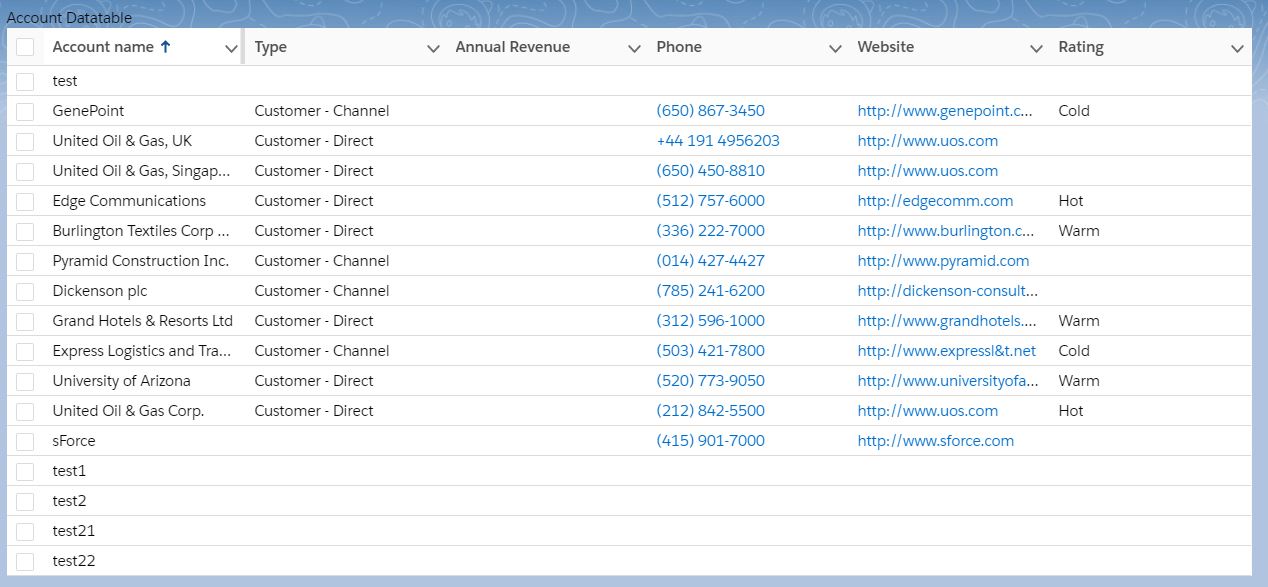
We will have following output:

Lightning Web Component lightning datatable

For more detail please refer to official link.

Happy Coding 🙂

Permanent link to this article: https://www.sfdcpoint.com/salesforce/lightning-web-component-lightning-datatable/

Call Apex Methods In Lightning web components

Call Apex Methods In Lightning web components

Lightning web components can import methods from Apex classes into the JavaScript classes. Once after importing the apex class method you can able call the apex methods as functions into the component by calling either via the wire service or imperatively. The Apex Method should be marked with @AuraEnabled. Before you use an Apex method, make sure that there isn’t an easier way to get the data. See whether a base Lightning component, like lightning-record-form, lightning-record-view-form, or lightning-record-edit-form works for your use case. If they don’t give you enough flexibility, use a wire adapter like getListUi or getRecordUi. And if you can’t use a wire adapter, write an Apex method.

In this example, we will query all account records and will display it.

Import Syntax

We need to import the @salesforce/apex scoped module into JavaScript controller class.

import apexMethodName from '@salesforce/apex/Namespace.Classname.apexMethodReference';

Here is list of important point of importing apex method:

  • apexMethodName : An imported symbol that identifies the Apex method.
  • apexMethodReference : The name of the Apex method to import.
  • Classname : The name of the Apex class.
  • Namespace—The namespace of the Salesforce organization. Specify a namespace unless the organization uses the default namespace (c), in which case don’t specify it.


Call Apex Methods In Lightning web components Example

Apex class AccountHelper

 
public with sharing class AccountHelper {
    @AuraEnabled(cacheable=true)
    public static List<Account> getAccountList() {
        return [SELECT Id, Name, Type, Rating, Phone 
            FROM Account];
    }
}

We can call the apex class in  Lightning web component using these different ways:

  • Wire a property
  • Wire a function
  • Call a method imperatively


Wire a property in lightning Web Component

We can invoke apex method from a component via the wire service. We can @wire a property or a function. Here is the syntax

 
import apexMethod from '@salesforce/apex/Namespace.Classname.apexMethod';
@wire(apexMethod, { apexMethodParams })
propertyOrFunction;

Lets see example of Wire an Apex Method to a Property

accountListLWC.js

 
import { LightningElement, wire } from 'lwc';
import getAccountList from '@salesforce/apex/AccountHelper.getAccountList';
 
export default class AccountListLWC extends LightningElement {
    @wire(getAccountList) accounts;
}

accountListLWC.html

 
<template>
    <lightning-card title="Account List From Apex" icon-name="custom:custom63">
            <div class="slds-m-around_medium">
                <template if:true={accounts.data}>
                    <template for:each={accounts.data} for:item="acc">
                        <p key={acc.Id}>{acc.Name}</p>
                    </template>
                </template>
                <template if:true={accounts.error}>
                    {accounts.error}
                </template>
            </div>
        </lightning-card>
</template>

accountListLWC.js-meta.xml

 
<?xml version="1.0" encoding="UTF-8"?>
<LightningComponentBundle xmlns="http://soap.sforce.com/2006/04/metadata">
    <apiVersion>48.0</apiVersion>
    <isExposed>true</isExposed>
    <targets>
        <target>lightning__HomePage</target>
    </targets>
</LightningComponentBundle>

Now we can add this lwc component on account detail page.

  • Go to Home page
  • Click Setup (Gear Icon) and select Edit Page.
  • Under Custom Components, find your accountListLWC component and drag it on right hand side top.
  • Click Save and activate.

We will have following output.


Wire a function in lightning Web Component

We can use same example of showing account list

accountListLWC.js

import { LightningElement, wire,track } from 'lwc';
import getAccountList from '@salesforce/apex/AccountHelper.getAccountList';
 
export default class AccountListLWC extends LightningElement {
    @track accounts;
    @track error;
    @wire(getAccountList)
    wiredAccounts({ error, data }) {
        if (data) {
            this.accounts = data;
        } else if (error) {
            console.log(error);
            this.error = error;
        }
    }
}

accountListLWC.html

 
<template>
    <lightning-card title="Account List using Apex Wire To Function" icon-name="custom:custom63">
        <div class="slds-m-around_medium">
            <template if:true={accounts}>
                <template for:each={accounts} for:item="acc">
                    <p key={acc.Id}>{acc.Name}</p>
                </template>
            </template>
            <template if:true={error}>
                {error}
            </template>
        </div>
    </lightning-card>
</template>

Call a method imperatively

accountListLWC.js

import { LightningElement, track } from 'lwc';
import getAccountList from '@salesforce/apex/AccountHelper.getAccountList';
export default class AccountListLWC extends LightningElement {
    @track accounts;
    @track error;
    handleLoad() {
        getAccountList()
            .then(result => {
                this.accounts = result;
            })
            .catch(error => {
                this.error = error;
            });
    }
}

accountListLWC.html

<template>
    <lightning-card title="Account List using ApexImperativeMethod" icon-name="custom:custom63">
        <div class="slds-m-around_medium">
            <p class="slds-m-bottom_small">
                <lightning-button label="Load Accounts" onclick={handleLoad}></lightning-button>
            </p>
            <template if:true={accounts}>
                <template for:each={accounts} for:item="acc">
                    <p key={acc.Id}>{acc.Name}</p>
                </template>
            </template>
            <template if:true={error}>
                {error}
            </template>
        </div>
    </lightning-card>
</template>

Following will be output when you click on Load Account button

Call Apex Methods In LWC Imperative Method

For more detail please refer to official link.

Happy Coding 🙂

Permanent link to this article: https://www.sfdcpoint.com/salesforce/call-apex-methods-in-lightning-web-components/

lightning-record-view-form

lightning-record-view-form

A lightning-record-view-form component is a wrapper component that accepts a record ID and is used to display one or more fields and labels associated with that record using lightning-output-field. lightning-record-view-form requires a record ID to display the fields on the record. It doesn’t require additional Apex controllers or Lightning Data Service to display record data. This component also takes care of field-level security and sharing for you. Users will see data only if they have access to view specific field and record.

Lets create simple lightning web component to get account detail.

lightning-record-view-form example in lightning web component

Create recordIdExampleLWC lightning web component from Visual studio code. Use Control shift P and type SFDX: Create Lightning Web Component.

recordIdExampleLWC.html

In html file, we are using lightning-record-view-form to show account detail using recorid. We can also use recordid to query Account record or some other details related to account.

 
<template>
    <div class="acc-container">
        <lightning-record-view-form record-id={recordId} object-api-name="Account">
            <div class="slds-grid">
                <div class="slds-col slds-size_1-of-2">
                    <lightning-output-field field-name="Name"></lightning-output-field>
                    <lightning-output-field field-name="Website"></lightning-output-field>
                </div>
                <div class="slds-col slds-size_1-of-2">
                    <lightning-output-field field-name="Industry"></lightning-output-field>
                    <lightning-output-field field-name="AnnualRevenue"></lightning-output-field>
                </div>
            </div>
        </lightning-record-view-form>
    </div>
</template>

recordIdExampleLWC.js

import { LightningElement,api } from 'lwc';

export default class RecordIdExampleLWC extends LightningElement {
    @api recordId;
}

recordIdExampleLWC.css

Lets apply some styles to our component

 
.acc-container {
    background: white !important;
    border: 1px solid black !important;
}

recordIdExampleLWC.js-meta.xml

 
<?xml version="1.0" encoding="UTF-8"?>
<LightningComponentBundle xmlns="http://soap.sforce.com/2006/04/metadata">
    <apiVersion>48.0</apiVersion>
    <isExposed>true</isExposed>
    <targets>
        <target>lightning__RecordPage</target>
    </targets>
</LightningComponentBundle>

No we can add this lwc component on account detail page.

  • Go to Account tab.
  • Open any record.
  • Click Setup (Gear Icon) and select Edit Page.
  • Under Custom Components, find your recordIdExampleLWC component and drag it on right hand side top.
  • Click Save and activate.

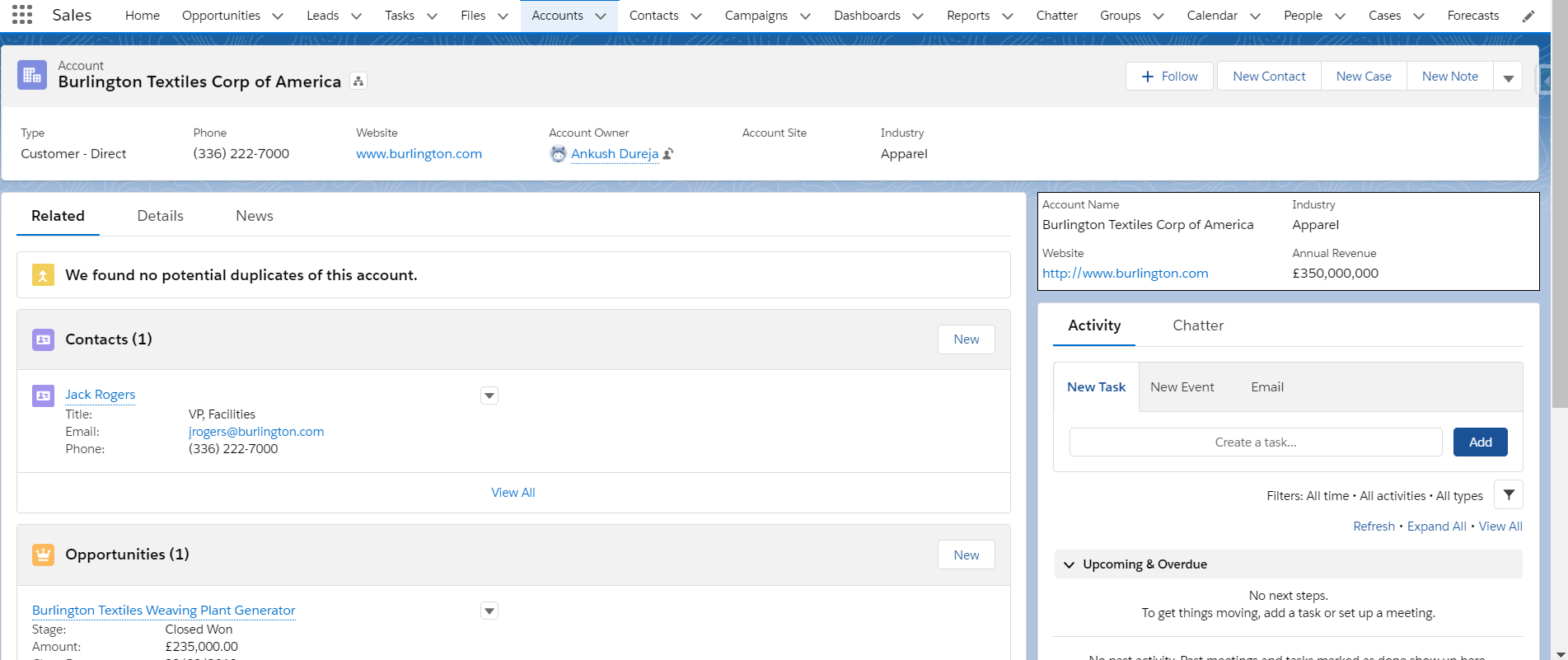
We will have following output.

Get Record Id in Lightning Web Component Account Record


Supported Objects

This component doesn’t support all Salesforce standard objects. For example, the Event and Task objects are not supported. This limitation also applies to a record that references a field that belongs to an unsupported object.

External objects and person accounts are not supported.

For more details please refer to official link.

Happy Coding 🙂

Permanent link to this article: https://www.sfdcpoint.com/salesforce/lightning-record-view-form/

Get Record Id in Lightning Web Component

Get Record Id in Lightning Web Component

Get Record Id in Lightning Web Component

Getting current record id in lightning web component(lwc) is very easy.

If a component with a recordId property is used on a Lightning record page, the page sets the property to the ID of the current record. In the component’s JavaScript class, use the @api decorator to create a public recordId property. Here is example of javascript class.

import { LightningElement, api } from 'lwc';
export default class LWCExample extends LightningElement {
    @api recordId;
}

To get current record id in lightning component(aura component), we had to implement force:hasRecordId to get record id in lightning aura component. But in lightning we component its very simple, we only need to use recordId property with @api decorator.

Lets create simple lightning web component to get account detail.

Create recordIdExampleLWC lightning web component from Visual studio code. Use Control shift P and type SFDX: Create Lightning Web Component.

recordIdExampleLWC.html

In html file, we are using lightning-record-view-form to show account detail using recorid. We can also use recordid to query Account record or some other details related to account.

 
<template>
    <div class="acc-container">
        <lightning-record-view-form record-id={recordId} object-api-name="Account">
            <div class="slds-grid">
                <div class="slds-col slds-size_1-of-2">
                    <lightning-output-field field-name="Name"></lightning-output-field>
                    <lightning-output-field field-name="Website"></lightning-output-field>
                </div>
                <div class="slds-col slds-size_1-of-2">
                    <lightning-output-field field-name="Industry"></lightning-output-field>
                    <lightning-output-field field-name="AnnualRevenue"></lightning-output-field>
                </div>
            </div>
        </lightning-record-view-form>
    </div>
</template>

recordIdExampleLWC.js

import { LightningElement,api } from 'lwc';

export default class RecordIdExampleLWC extends LightningElement {
    @api recordId;
}

recordIdExampleLWC.css

Lets apply some styles to our component

 
.acc-container {
    background: white !important;
    border: 1px solid black !important;
}

recordIdExampleLWC.js-meta.xml

 
<?xml version="1.0" encoding="UTF-8"?>
<LightningComponentBundle xmlns="http://soap.sforce.com/2006/04/metadata">
    <apiVersion>48.0</apiVersion>
    <isExposed>true</isExposed>
    <targets>
        <target>lightning__RecordPage</target>
    </targets>
</LightningComponentBundle>

No we can add this lwc component on account detail page.

  • Go to Account tab.
  • Open any record.
  • Click Setup (Gear Icon) and select Edit Page.
  • Under Custom Components, find your recordIdExampleLWC component and drag it on right hand side top.
  • Click Save and activate.

We will have following output.

Get Record Id in Lightning Web Component Account Record


For more details please refer to official link.

Happy Coding 🙂

Permanent link to this article: https://www.sfdcpoint.com/salesforce/get-record-id-in-lightning-web-component/

Data Skew Salesforce

Data Skew Salesforce

What is data skew in Salesforce?

Data skew in Salesforce happens when large number of child records (more then 10k) are linked to one parent records.

Data Skew Salesforce

Type of Data skew

There are 3 types of data skew in salesforce:

  • Account data skew
  • Ownership skew
  • Lookup Skew

Account data skew:

Certain Salesforce objects, like accounts and opportunities, have special data relationships that maintain parent and child record access under private sharing models. Too many child records associated with the same parent object in one of these relationships causes account data skew. Say you have a bunch of unassigned contacts and park them under one account named “Unassigned.” This can create issues with record locking and sharing performance.

Certain Salesforce objects, such as accounts and opportunities, have special data relationships that maintain parent and child record access under private sharing models. If too many child records are associated with same parent object in one of these relationships, this imbalance causes something called “account data skew,” which in turn causes performance problems.

If you are unfamiliar with account data skew, you can read more about it here.

Ownership Skew:

Similarly, when a large number of records with the same object type are owned by a single user, this imbalance causes something called “ownership skew.” Ownership skew also causes performance problems, which can surface when you’re managing your role hierarchy and sharing rules.

If you are unfamiliar with ownership skew, you can read more about it here.

Lookup Skew:

Lookup skew happens when a very large number of records are associated to a single record in the lookup object.  Because you can place lookup fields on any object in Salesforce, lookup skew can create problems for any object within your organization.

For more details about data skew refer to official salesforce link.

Permanent link to this article: https://www.sfdcpoint.com/salesforce/data-skew-salesforce/